Graffiti Moe started as a terminal thing on purpose. curl a random spray, slap one up with a one-liner, feel like you’re tagging a wall that only nerds walk past. Fun. Also… a little exclusive.
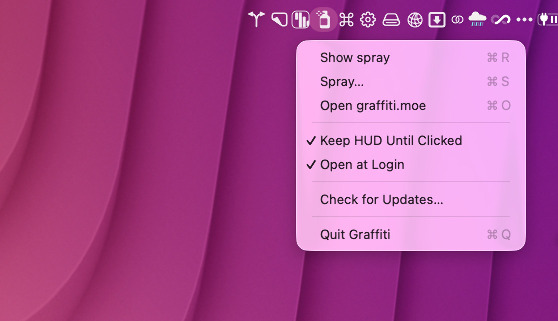
I wanted that same fun for people who never open Terminal. So I built GraffitiMac — a tiny menu-bar app that lives next to your clock and occasionally reminds you that the wall is still weird and alive.
Login spray, on demand spray
Turn on Open at Login and every time your Mac wakes up into the day, you get a random spray in a little HUD. No Dock icon. No fuss. Just a piece of anonymous ASCII (or plain text) floating in for a few seconds.
Not in the mood to reboot for fun? Hit Show spray from the menu bar whenever you want another one. Same wall, same chaos, your schedule.
Spray without leaving the desktop
Prefer to contribute instead of lurk? Spray… opens the graffiti.moe compose page right from the menu bar. Paint a tag, send it, go back to whatever you were pretending to work on.
Flag the junk
The wall is anonymous and mostly unfiltered, which is the point — and also why a Flag button exists on the HUD. See something that doesn’t belong (hate, spam, pure noise)? Flag it. Those get reviewed. You’re not the hall monitor; you’re just helping keep the wall worth reading.
Come spray something
If you’ve been watching from the sidelines, this is your nudge. The Mac app is free. The site is free. The whole thing is open source:
Grab GraffitiMac from the site (Mac App → Download) or from GitHub Releases, leave it in the menu bar, and add your own mark to the wall. The terminal crowd will still be curling. You can just click.
By the way, you can find a lot of fun ASCII (plain text) art at
asciiart.eu. And you can draw with
Monodraw or online
with the ascii draw studio,
to keep things interesting.