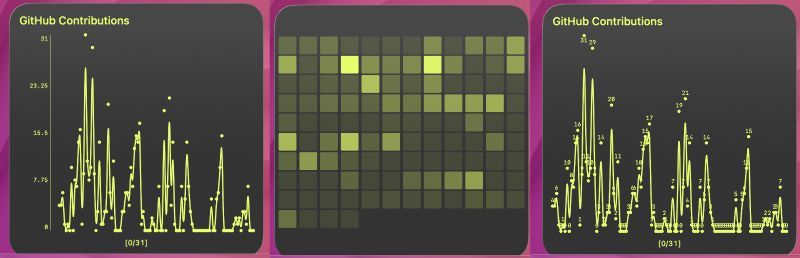
The Contrib API I published last week for generating GitHub contribution heatmaps as a PNG you can drop into a TerminalWidget, blog post, or slide deck, now goes further than “pick a username and theme.”
First of all, I’ve open sourced the Contrib project on GitHub. Feel free to fork and play with it if you want to. The version on my server will continue to run as a publicly-available API, but you can do what you will with the code.
As a real-life application (outside of TerminalWidget), I’ve used the API to add a contribution graph to my contact page. It just uses a Markdown image tag with a Contrib API url as the source. So every time my contact page loads, you get an up-to-date graph. If my Contact page were higher traffic, I’d have to look into caching a bit. The API scales pretty well for 10-100 simultaneous hits, but anything more than that would require some adjustment. I’ve added a SCALING.md file to the repo that details a potential path, should that ever become necessary.
Additions
You can now specify weeks instead of months, how chunky the squares look (all the way down to circles), whether the background is transparent, and which font drives the captions. You can also specify header and/or footer text to be rendered in the image.
Everything below works two ways: play with it in the interactive tester on the Contrib page, or pass the same parameters on the REST-style image endpoint (GET /contrib/generate?...).
Time range: months or exact week columns
You can still ask for a span in months, but if you want the grid to match a specific number of week columns (aligned like GitHub’s Sunday-based weeks, ending “now”), use weeks=N. When weeks is present it wins over months, and the calendar trims to that many columns.
Example:
GET https://brettterpstra.com/contrib/generate?username=octocat&weeks=16&theme=light&width=1200
Padding and corner radius
padding is the margin around the chart in pixels (handy when you are compositing the PNG onto something else). corner_radius is a 0–100 control for how round each cell is: 0 is square, 100 pushes to circles, and the default (20) keeps the familiar lightly rounded look unless you override it.
Transparent backgrounds (opt-in)
Transparency is off unless you ask for it. Pass something truthy like transparent=1 (or true / yes / on) and you get an RGBA PNG with a transparent canvas while the contribution squares and caption text stay readable. The tester shows a checkerboard behind the preview so you can see what is actually see-through.
Caption fonts and scaling
font picks a caption preset (Helvetica-style default, DejaVu, Liberation, Arial, Inter, Noto, Georgia, system UI, and friends). Caption size and spacing scale with output width, so wide exports do not end up with tiny labels. If your range crosses January, year labels center over each calendar year instead of looking pasted on wrong.
Headers and Footers
You can use header=TEXT and * *footer=TEXT** along with headerAlign=[l|c|r] and footerAlign=[l|c|r] to add custom headers. Text should be URL encoded, and will inherit the font used for the rest of the captions. Headers are rendered 30px above the top of any captions, or 30px below the chart.
Using the Tester vs the API
The tester has been updated with the new options, and builds the same query string the API expects: set username, theme, width, months or weeks, captions, download behavior, transparent, padding, corner_radius, and font. Sliders update the live preview on a short delay so typing and dragging do not spam the server; toggles and dropdowns refresh immediately. Copy the generated URL or open it in a new tab when you’re happy.
The API is the same contract: one GET request returns a PNG. Pair it with download=1 when you want a download-friendly response for automation.
If you already use the graph embed, try weeks, padding, and corner_radius first; they are the fastest way to get a layout that fits your page (or widget) without an extra crop step.
In TerminalWidget
With these changes, I can now make a TerminalWidget widget with an image that fits the format of the widget perfectly, showing exactly the right number of columns to fill the widget, with circles, squares, or rounded rectangles, and a transparent background so I can apply my own widget background.
There’s also a TerminalWidget-specific option for outputting just
chart data in a string TerminalWidget can turn into its own chart.
Just add chart-data=1 to output a string of values instead of a PNG.
This string can be used to generate charts in any of TerminalWidgets
chart formats.
The command to generate something like these would be:
For those interested in trying out TerminalWidget, the beta is public. Unfortunately the latest version of the macOS build hasn’t been approved yet (still “Waiting for review” after a full week), but it will be updated soon 🤞. Join the TerminalWidget mailing list if you’d like to be notified about progress.