Merry Christmas! I’m all alone for the most part today (I’m ok with it), so working on a few different projects. Here’s my 4am accomplishment, such that it is.
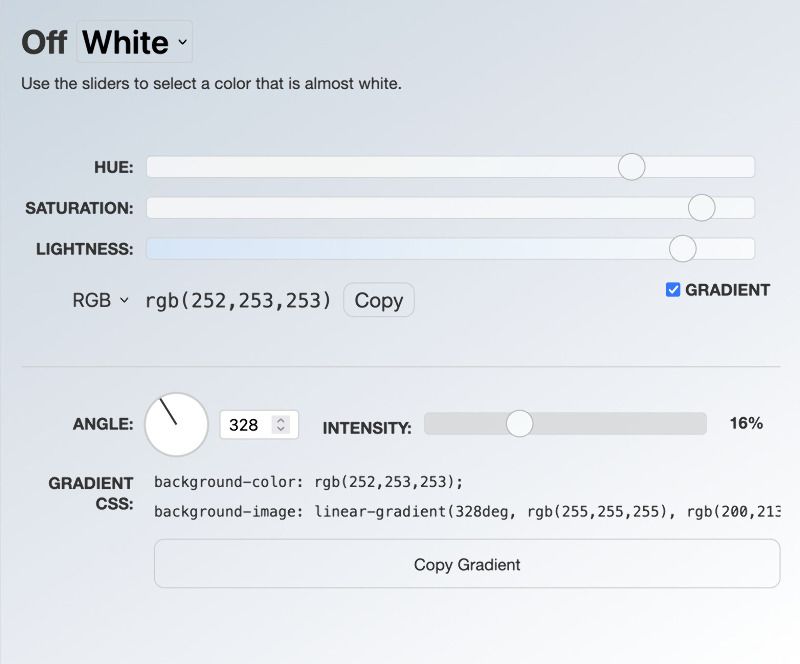
In the process of designing emails for the Marked 3 launch, I was using my Off (White) generator and found myself wishing I could easily make simple gradients. So I built that.
Off (White) is a stupid thing I made back in April that helps you find subtle off-white or off-black colors. I’ve found that for creating just-barely-off-white and -black colors, most slider setups were too finicky. So I just made an HSL slider bank that had a very limited range and wide sliders, allowing very exact color selections.
The Gradient Feature
When you check the new “Gradient” checkbox, a section appears with controls for creating a linear gradient. The gradient is automatically calculated from your selected color, creating a light end (15% lighter) and a dark end (15% darker) by default.
The intensity slider lets you adjust how much lighter and darker the gradient ends are, from 0% to 50%.
There’s also an angle dial. Instead of just typing a number, you can click and drag the dial to set the gradient angle from 0 to 360 degrees. The dial provides visual feedback as you rotate it, and the angle input field stays in sync.
CSS Output
The gradient CSS output includes both a fallback background color and the linear gradient, using background-color and background-image properties. This ensures better browser compatibility and provides a solid color fallback for older browsers.
The output is formatted on two lines for readability, and there’s a dedicated copy button that will copy the gradient CSS properties instead of just the color code.
How It Works
The gradient calculation uses HSL color space to adjust lightness values. The light end is calculated as lightness + intensity (clamped to 100), and the dark end is lightness - intensity (clamped to 0). This ensures the gradient always works within valid color ranges.
Take it for a spin! I’m 99% sure you won’t have a use for it right now, but it might be worth bookmarking for the next time you need a subtle gradient.