nvALT 1.0.3
nvALT 1.0.3 has been posted for automatic updates and direct download. If you’re already running nvALT (formerly Notational Velocity ALT), just go to the application menu and choose “Check for Updates” to get the latest version. Otherwise, download it from the project page.
I removed the blue background due to popular demand. Ian Soper has designed some great themes which will be available from a theme selector in an upcoming version, but for now it’s basically white. I also fixed the mixed-up interface issue for French and Portuguese users by reverting the affected nibs to English-only until I finalize the interface and get the localized versions in place.
Add a few bugfixes (and hopefully not too many new bugs) and you’ve got the incremental release that is version 1.0.3! There are new features on the way, but I wanted to get these minor changes out for users as quickly as possible.
Changes
- Darker, wider, cleaner scrollbar
- Ignore parenthesis when scanning for URLs
- Remove blue background
- Temporarily removed affected French and Portuguese nibs
- Bug fixes
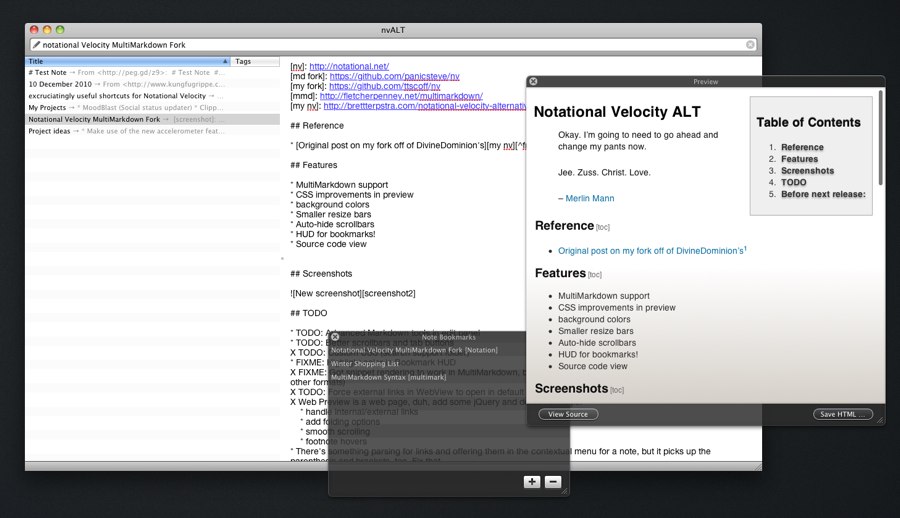

The divider between the list of files and the content is white, making it effectively invisible except for the dot that is used to resize it. Not sure if it is intentional or not, but it looks a bit strange to my eye.
It’s intentional, but mostly left over from when the blue created the aesthetic division. I don’t really want the full shaded bar, but I’m definitely open to feedback and options.
I agree with TJ. It felt a little strange to my eye as well, but I completely understand the difference in design aesthetic (the reason you made the move away from the blue during this last update in the first place).
I actually preferred having the blue color to differentiate between the two panes. I’m eager to get the option to put it (or something like it) back.
Coming very soon :). Customizable background has already been completed, just working on closing a few other feature branches before I publish it.
I don’t mind the loss of the blue so much as the lack of even a grey line between the divider and each pane. That’s really inexcusable. At least iTunes has a single line. I had gone back to list on top mode, but either way is annoying like IDE text editors that have a left gutter for breakpoints and bookmarks that has the same background color or no divider line, so clicking on the start of the line versus toggling a breakpoint becomes tricky.
To clarify, you shouldn’t have to color the panes differently to see the divider. An alternative is to make the affordance grip go all the way across instead of being just a single dot.
Already covered. Just sit back and wait for 1.0.4.
Hi. After using NV for some years I really like what you’ve done with the Alt version. Actually, I liked the blue background — restful on the eyes and a good colour so I hope an option for something similar emerges soon. Thanks again.
Hi guyb,
Based on the release notes, it looks like Brett plans to incorporate a “theme selector” in the future. This should open up a world of possibility as far as dialing in the exact look and feel that everyone would prefer in the UI.
I sort of liked the blue in that it was in the OS X style of a blue content pane, but I thought it was too dark, making it hard to read the text within it.
Your changes break underlining for any URL that contains parentheses:
http://en.wikipedia.org/wiki/Orders_of_magnitude_(angular_velocity)
You’re right, sorry about that. Looks like I’ll have to resort to regular expressions to find the links. The problem was that the primary Markdown link format,
[text](link), was picking up the parenthesis in several functions and thereby breaking them. I’ll change things around for the next release and come up with a better fix.Thanks for the heads up.
Any chance of joining one of the many forks? Another user has forked and it’d be great to get these in the upstream
I’d like some sort of auto show/hide feature for the notes list. When I’m searching, I want it to show, but when editing, not so much. Right now, if you have the notes list hidden, it doesn’t show when focus moves to the search bar, and doesn’t show when then pressing up/down even though you are moving up/down the hidden list.
I was thinking that when in the search bar or navigating the list, it should expand to a max size set by the divider when in that mode, and change to a minimum size set by the divider when focus is in the edit pane. However, in non-widescreen mode, the top of the edit window would jump around unless you put the list pane at the bottom.