Home Link

Hello, my name is Brett Terpstra, and it’s nice to meet you. Elegant solutions to complex problems. Curious?

Post thumbnail for post 541

Instapaper Beyond for Safari

Instapaper Beyond for Safari Tagged:

The Instapaper Beyond Extension now has it’s own page. Check it out!
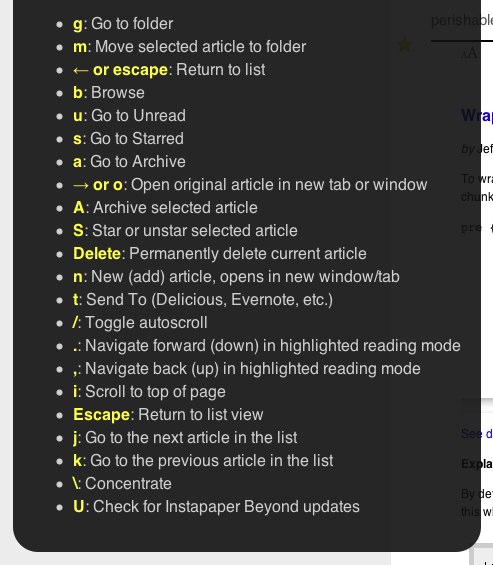
Instapaper Beyond is officially available as a Safari 5 extension! For Safari users new to Instapaper Beyond, it’s an extension which adds full keyboard navigation and Ajax loading to Instapaper. For example, when the page loads, the first article in the list is highlighted. Using up/down arrows, or j/k, you can navigate forward and backwards. Right arrow or “o” will open an Ajax view of the article from which j/k will continue to navigate articles in text mode.

Pressing the spacebar in text view will page down 1 page (shift-space to page up), and at the bottom of a page, spacebar will load the next article. “s” will go to starred articles, “S” (shift-s) will star an article, etc. There are tons of commands available in addition to basic navigation, and the context-sensitive help is always a key away (h).

I recommend turning off auto-archiving of articles (Apparently this isn’t even an option anymore –thanks to Mark for noticing). Now that you can archive an article with Shift-A, it’s just as easy to take manual control, and less confusing when using the Ajax view.

I’m sure I’ll continue to tweak and bugfix this extension, but I set up the auto-update manifest in the extension, so any updates will automatically install for Safari 5 users. Use the link below to download the extension, then double-click the downloaded file to install it. You must have extensions enabled in your Safari preferences.

Also, the Instapaper Beyond userscript for Fluid has also been updated to version 1.8, with improved spacebar handling and a few minor tweaks. Just press “U” in your Instapaper SSB to update to the latest version. You can read more about the original Instapaper Beyond script for Fluid here.

Download the extension here: Instapaper Beyond for Safari

Enjoy!

42 Responses to “Instapaper Beyond for Safari”

  1. Rude says:

    The download link gives a 404 ;-)

  2. Wevah says:

    I’m still getting a 404…

  3. kobak says:

    still 404 for me.

    • Brett says:

      It’s working fine for me from multiple machines, but I added a direct link at the end of the post in case it doesn’t work for everybody. Please try it and let me know if it works better for you.

  4. Works for me as well.

  5. Hi Brett!

    Thanks for the great plugin — it adds quite a bit of useful features to Instapaper. Is it possible for you to add unread count and sort by date? That would be awesome!

    Thanks again!

  6. Roman says:

    Now I can not live without! Thank you Brett :-)))

  7. Thanks for this.

    “I recommend turning off auto-archiving of articles.”

    Is that even an option any more? I can’t find it.

    • Brett says:

      Guess not. It was when I started working on this, but apparently it’s been removed. Thanks, I’ll make a note in the post.

  8. Andrew Coyne says:

    Works great — thanks! — except the layout on the Main/Browse page seems screwed up.

    • Brett says:

      You’re welcome! I’m working on the Browse page thing (and a few other issues) right now. Fixing the key trapping to not conflict with other plugins is requiring some refactoring, but I’ll get an update out soon.

      • Andrew Coyne says:

        Another idea, while I’m making work for you: a contextual menu item to send links to Instapaper (without having to open them first). There’s a few apps that do this on iPad and it’s very handy.

        For extra credit: a contextual menu item to send links (or rather the pages to which they link) to DevonThink!

  9. […] while I’m just at it … since Safari 5 now supports extensions, this extension might be useful if you like keyboard shortcuts and use Instapaper on the web. This entry was […]

  10. […] Instapaper Beyond for Safari! « Brett Terpstra […]

  11. […] Instapaper Beyond – ตัวเสริมที่ทำให้อ่าน บทความใน Instapaper ได้สบายขึ้น […]

  12. The plugin works, but it also is restyling the main Instapaper home page.

  13. oops.. never mind.. shoulda read all the comments.

  14. J says:

    Loving your work. I’m not sure if this is format issue referenced by others, but I can’t get IP Beyond to play nice with IP Greystyled. Unread page loads fine and shortcuts seem to work but formatting goes wonky (unreadable) when you go into each article. This only on Safari (extension), I can get it to work fine using Fluid but it’s not my preferred route. Pls let me know if there’s a fix, I’d hate to choose between the two!

    • Brett says:

      I am working on a fix. More specifically, a workaround. IB doesn’t load the pages that Greystyled is expecting, but rather its own Ajax rendering of the text versions. I could easily enough override the styling in Greystyled and correct it for my version of the pages, but I’d rather work on creating some compatibility with other and future userstyles. I’m hoping to have this worked out for the next update, along with a fix for the fact that you can’t use the text-styling tools built into Instapaper when IB is running…

  15. Adam says:

    Hey there, loving the extension. Great work. I’ve noticed though that in the article view, the formatting controls are broken—is this a known issue? I have to disable the extension to change text size, font etc.

  16. […] Instapaper-Nutzer ist Instapaper Beyond ein absolutes Muss. Die Erweiterung fügt Tastaturkürzel und Ajax-Loading zu Instapaper hinzu und […]

  17. This is fantastic! I only just discovered Safari Extensions today — glad I came across this one early on, it’ll speed up my morning reading no end.

  18. […] Instapaper Beyond – Tastaturkürzel für Instapaper. […]

  19. […] Instapaper Beyond:Instapaperでキーボードショートカットを使えるようにしてくれます。 […]

  20. Tom says:

    Due to working on a german system with a macbook I would like to see two changes the \ key is a key combination on a german keyboard, the delete key doesn’t exist on the macbook keyboard, so I would like to see some alternatives there :-)

  21. Dan says:

    Hi I’ve just discovered both instapaper and your instapaper beyond; both are great. One problem which seems to only be there with the instapaper beyond extension enabled is that when using the Instapaper Text bookmark thing to view a web page with the simplified formatting provided by this tool, the curser keys seem to be disabled (or at least they don’t work). I don’t seem to have this problem with the instapaper beyond extension disabled. And don’t have the problem when viewing text versions of pages saved to instapaper — only when using instapaper text.

    I wondered if you were aware of this or could confirm if this is a possible knock-on effect of the extension.

  22. bas says:

    Great extension. How can I show up the help menu?

  23. Scott says:

    Brett,

    You deserve a techie medal of honor for developing this extension. This baby is going to save me countless hours of sorting through my barrage of Instapaper links. For what’s it worth, I’ll chime in and agree that a send-to-DevonThink shortcut key would rock. Thank you!

  24. hisaac says:

    I’d sure love this as a Chrome extension.

Entries (RSS) and Comments (RSS), or Subscribe by Email