 Dropzone recently showed up on the Mac App Store. I’ve been using the previous incarnation daily for years now, and I was ecstatic to see it hit the App Store and still be under active development. As with any pre-App Store app that makes a 100% conversion to the App Store environment, plenty of users are bitching and moaning about having to pay again (as well as changes that were necessary to comply with Apple’s guidelines), but I’m not among them. It’s worth every penny and supporting continued development is something I’m more than happy to do.
On Dropzone
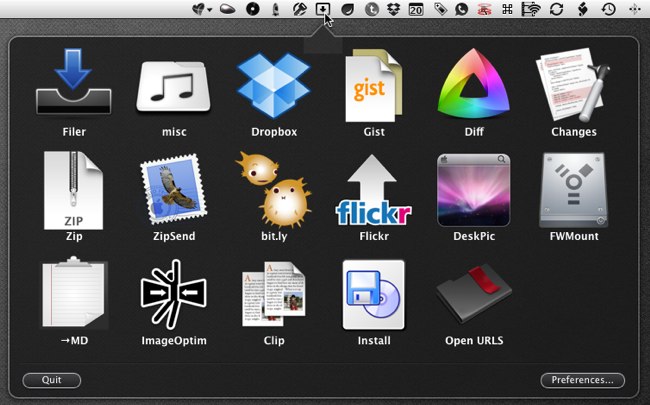
Dropzone is an app with a simple concept: provide an easily-accessible palette for “Destinations” where you can drop text or files and have any number of operations performed on them. Zip them, install them, email them, add them to Dropbox, get a shortened link… a wide variety of default Destinations is available, plus there’s an easy Ruby API with which you can extend Dropzone to do anything you like. You can also include straight application destinations that will open the app when clicked, or open any files dragged to the icon with the target application.
When you click the Dropzone icon in the menubar (it used to be in the Dock, but the implementation had to change for the Mac App Store version) or drag files or text over it, a palette pops up with large (size customizable) icons that you can drop on or click. Different Destinations have different responses when clicked or dropped on.
My Dropzone
My Dropzone includes some default Destinations and some custom scripts:
- A filer that works with my OpenMeta tagging system. Dropping tagged files on it sorts them into target folders based on their tags.
- A media filer that sorts pdf, audio and video files into a date-based filing system.
- An app installer that handles DMG, zip and app bundles, installing the application and updating older files.
- A Dropbox destination that will zip multiple files or copy single files into my public Dropbox folder and place a public link in my clipboard.
- A shortcut to create a GitHub gist from contents dropped on it.
- Diff shortcuts to open multiple files for comparison, one for Changes and one for Kaleidoscope.
- One drop point to zip multiple files and one to Zip and create an email with the archive attached.
- Shorten a url with bit.ly.
- One to upload pictures to Flickr.
- One to set my Desktop picture to a dropped image.
- One to mount/unmount all of my Firewire drives at once.
- One to find all the links on my clipboard and create a Markdown reference list with them.
- One that’s just a link to ImageOptim which opens a dropped image and compresses/optimizes it in place (perfect for bloggers).
- A Destination that accepts one or more text files, concatenates their contents and puts them on the clipboard.
- My latest Destination, a link-opening script that accepts dropped text files, dragged text or clipboard input, opening all contained links in your default browser (more info on that coming soon).
This tool belt makes invaluable functions available to me at any time, from anywhere on my system. In short, I love it. It’s become a default part of the way I work. I can add and change destinations at any time as my workflow changes, and because I have a working grasp of Ruby, I can make just about anything that can be scripted happen. The API allows me to control the progress indicator, the text responses and what ultimately happens when the script is complete, including creating a clickable HUD that links to whatever resulting URL the Destination creates.
If you’re not already using Dropzone, it’s definitely worth a look. It’s $13.99 on the Mac App Store, and additional destinations are freely available at the website. There’s also a GitHub repo for contributing your own Destinations. Just fork it, add your contribution and make a pull request. I have several in there, and many of the custom scripts listed above are publicly available there.
