TabLinks Safari Extension
TabLinks is a quick experiment, designed to meet my own needs. It needs some work, but it does the trick: it copies the link information for every tab open in Safari, and outputs them as a list, based on a user-defined template. You set up your template in the Extension settings, and use the following variables to define your link style:
- %u = URL
- %t = title
- %w = window index
- %n = tab index (within window)
That’s all there is for now. The default link format is a Markdown reference list, with the references being window#-tab#, so they come out as [0-12]: yourlink.com "and its title". If you dig Markdown, you can easily modify this to make a list of titles linked to their respective pages by changing the template to * [%t](%u). If you’d rather get plain HTML, try <a href="%u">%t</a>. Maybe you just want a list of URLs, in which case your template would just be %u.
Like I said, it’s pretty simple right now, and may stay that way while I go back to tidy up and improve on InstapaperBeyond. I do plan to add a checkbox to the settings that lets you decide whether clicking the toolbar button copies just the current window’s tabs, or all tabs as it does now. I would have liked to add a “copy to clipboard” button, but (as far as I know), Safari doesn’t allow access to the clipboard in any fashion, even with something like ZeroClipboard.
The popup window could use some classing up, too… a little CSS3 animation/transition and some more consistent styling that isn’t constantly being overridden by site styles. However, it’s quite useful to me as is, so I’m sharing it in the hopes that others will find it as helpful as I do. Personally, I use it when I write posts, especially on TUAW, where there are a lot of links to deal with. I pop open the links I know, run searches in new tabs for the ones I need, then copy the whole bunch as references to paste into the top of my post.
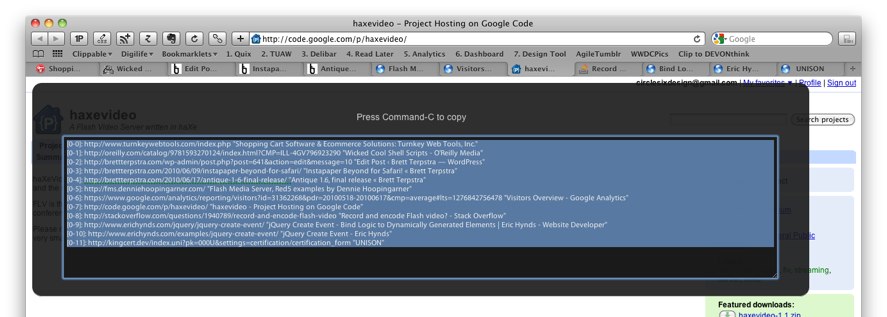
TabLinks Safari Extension — TabLinks gathers all of the link information from every open tab and presents them for copying based on a user-defined template. More Info

Just perfect. Both design and utility. One thing. I had to restart to have the extension running.
Thank you!
Brilliant thingie!:))))
So pray tell, what makes this different from the AppleScript I’ve had in my Scripts folder for the last two years (also courtesy of you, of course)?
Love seeing you release your private brilliance to the public!!
Well, I don’t remember which script I was working on two years ago… :). This one is faster than AppleScript and is more easily customized with my poor-man’s template function. It still needs to be able to limit to just the current window, but in the end it will be more flexible than any of the AppleScripts I’ve used for this purpose.
Truth is, though, I still use AS for saving batches of bookmarks to Evernote, and in the TextMate bundles that you and I use you can grab all or selected tabs from Safari, right in TextMate. So, in the end, this becomes an ocassionally-useful proof of concept in my actual workflow :).
Favicons on tabs? I certainly missed something. How’d you get those?
Ah, Glims. Check it out, the latest version is Safari 5-ready and it adds a lot of features without using SIMBL.
http://www.machangout.com/
Thanks. I stayed away from these kinds of things before because of simbl and/or other layers of whatnot…
This “If you’d rather get plain HTML, try %t. ” does not work for me. I just get blank window with as many blank lines as there are opened tabs. Thanks and cheers.
I know it didn’t show up right in the comments, but I got your plain text, so it made sense. I tried it, and you’re right. I’ll figure it out and send out an automatic update as soon as I get a chance.
Thanks for the bug report!
I just updated TabLinks to 1.3, which does nothing else other than solve this issue with HTML. I’ll add more to it as I get time, but that was a pretty glaring bug :).
[…] Tab Links […]
I think it’s a beautiful idea, I installed it from extensions.apple.com and then came here to read up more about it. Unfortunately after repeated testing I’ve come to the conclusion that it does nothing. Maybe it’s bust, but I don’t get anything like in your screen-shot. I even tried uninstalling, downloaded the zip file from here and tested again. Nothing. Using Safari 5.0.1 (5533.17.8).
I’ll need to know more about how you’re using it to figure out why it’s not working for you. It has to be run in a tab which has a page loaded in it, but beyond that, it really should function in almost any case. Do you have a template set in the preferences (there’s one loaded by default)?
I’ve just tested again and it works now. Seems like all that was needed was a total restart of Safari. Apologies for the noise, I should have tested for that to before reporting a problem. In my defence I was mislead by extensions.apple.com saying that there was “no need to restart Safari”.
That you for this great extension. I’m quite chuffed with it. :-)
[…] 1. TabLinks […]
[…] 1. TabLinks […]
[…] 1. TabLinks […]
[…] 1. TabLinks […]
[…] 1. TabLinks […]
[…] 1. TabLinks […]
[…] 1. TabLinks […]
[…] 1. TabLinks […]
[…] amount of blogging – especially those that contain links to a variety of sources – TabLinks is a great […]
I love this extension. Was almost exactly what I was Googling for.
I used to use the Make Link Firefox Add-on and I really missed it when I moved to Safari.
The only thing this is lacking is customisation. MakeLink allows you to create HTML, Markdown, anything really, based on a template with variables. And gives a drop-down to select from many, rather than just having one.
One other thing… is there a way to trigger this extension with a keyboard shorcut? I’d love to be able to do all this without touching the trackpad.
You can customize in the Extensions section of Safari Preferences. Just take a look at the default and use the template variables listed.
There’s not currently a way to trigger from the keyboard. It’s possible, but I find it intrusive when plugins take over entire keys in all web pages. I may add an option to define your own in the next version, though.
Nice; though one thing: if “Block popup windows” is selected, then one never sees anything happen. (I was puzzled, and came here to find out what I was doing wrong.)
Perhaps an option to do it as a popup or in a new tab in the current window?
Thanks, I hadn’t run into that but I’ll check it out. I would definitely consider opening a better-looking window in a new tab, that would solve a ton of issues I run into with the current method…
