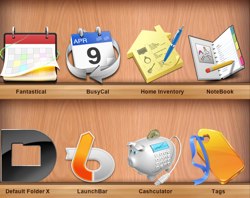
 I mentioned it on Twitter a while ago, but an email from a reader just prompted me to mention it again. As a perfect follow-up to my tagging article yesterday, some of the best apps for OpenMeta tagging are on sale through the Productive Macs Bundle!
The bundle is eight amazing apps for US $39.99. I’ve paid full price for every app in that bundle (totaling $246) over the years, and I don’t regret any of them. I don’t use Notebook much these days, but it’s an excellent way to collect and organize (and link) notes. Fantastical (similar to QuickCal) is gorgeous and highly functional (review coming soon), and Home Inventory and Cashculator both serve their intended purposes in top-notch fashion. I’ve met the guys behind BusyCal and their dedication to making their software the easiest fully-syncing iCal replacement is outstanding.
Most relevant, though, are the apps that make my tagging life easier. I use and love these apps every day:
- Tags: I mention this app frequently, and its original price is almost the full amount of the bundle. If you tag or want to tag, just get this.
- Default Folder X: Aside from providing myriad features to make save/open dialogs exponentially more useful, it also allows OpenMeta tagging at the time you save your file (as well as Finder comments), including autocompletion of existing tags.
- Launchbar: Not directly a tagging application (though it can do some great tricks with a little scripting), this is what replaced Quicksilver for me back in the day. A lot of people have come to love Alfred, and rightly so, but I’ve tried both and Launchbar is still the way to go for me.
The value of these three apps alone make this bundle worth picking up (assuming you don’t already own them), and you will not be disappointed with the other apps included. It’s definitely the best (nerd) bundle I’ve seen in a long, long time. It’s only available for two more days, so check it out soon!
