I’ve taken a little time to improve the script I’d posted previously. It saves bookmarks you add to Delicious as webloc (Safari bookmark) files on your local hard drive, optionally with thumbnails and OpenMeta tags.
Why would you want to do this?
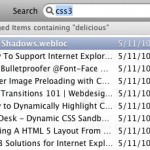 First, it adds Spotlight search abilities to your Delicious bookmarks, and, if you use OpenMeta tags, it integrates a tag-based search into any OpenMeta application. The second half of that is, in my case, I bookmark in different ways for different purposes, and it’s nice to have everything integrate into a full search in the end. For me, that search is primarily tag-based, thus the OpenMeta tagging. When I want to share a link, I use Delicious (via Delibar), and when I just want to save it for my own reference, I use OpenMeta (via Tags.app). This script is part of a system which blends the two, removing the need for redundant tagging and bringing my Spotlight searches together.
Read on for the new script, and installation instructions.
At the top of the script, you’ll find a section that looks like this:
-- CONFIG
-- delicious username
property _user : "username"
-- delicious password
property _pass : "password"
-- POSIX path to *existing* folder, manually create the folder if needed or point to one that does exist
property targetFolder : "/Users/OSXUSERNAME/Library/Caches/Metadata/Delicious"
-- use Tags.app to apply OpenMeta tags based on Delicious tags
property useTagsApp : true
-- add thumbnails using http://hasseg.org/setWeblocThumb/
property useWebLocThumb : true
-- END CONFIG
You’ll need to set these properties to your own information, but after that the script should take care of itself. Username and password are your login info for Delicious.com. Obviously, it won’t work without those. The targetFolder property should be set to a folder that already exists or that you just created for the purpose. The script will not create a folder that doesn’t exist. I recommend creating one in ~/Library/Caches/Metadata/Delicious, and just substituting your user name in the targetFolder config.
The last two configuration options determine whether posts are tagged with Tags.app and/or thumbnailed with setWeblocThumb. I recommend doing both, but if you have other purposes for the script, feel free to set these to false. In order to use either option, you’ll need to have the appropriate application installed. Tags is a $29US application that makes tagging everything from URL’s to iPhoto pictures, as well as files and folders, a breeze. Worth every penny, in my opinion. setWeblocThumb is a free utility that captures thumbnail images of the bookmarked page and applies it to the webloc file. It makes for very nice presentation of search results and bookmark folders.
The last thing you’ll probably want to alter is the first line after the end of the config. It sets the ‘date from’ parameter default to 1 hour prior, in Central Standard Time. If you’re not stuck in the middle of the country, you’ll want to edit the -v+4H part to a + or - number more indicative of your own GMT offset. It’s not a huge deal, this current script will grab everything after this date on the first run, but will record the date of the last bookmark it finds and use that for the next run, and so on. If you want to get all of your Delicious bookmarks on the first run, set this to something long, long ago.
I’ve smartened the script up a bit from the previous version, and solved some of the errors that caused the bookmark save to fail on certain filenames. It also checks for existing bookmarks before writing new ones to disk, avoiding duplicates.
As with the last script, you can use Lingon to set up an hourly run for the script in launchd, or even just set it as an alarm in iCal and use that to schedule it, but I’ve found a better solution. I use Delibar for bookmarking, and it writes out to an xml file in ~/Library/Application Support/Delibar. I used Lingon to set up a launchd process that watches for changes in that file and runs the script. Seems to work really well, at least so far. However you choose to run it, it will keep storing the latest date at the time of retrieval, so you can even just run it once a day (or week, or month) and it will find just the newest bookmarks.
Without further ado, here’s the script in its entirety, commented for readability:
Updated: Thanks to Matteo from Shiny Frog for tipping me off to the fact that the API rate limiting I was running into was due to the lack of a user agent. This has been added to the curl call in the script, testing will be much smoother now!
#!/usr/bin/osascript
-- CONFIG
-- delicious username
property _user : "username"
-- delicious password
property _pass : "password"
-- POSIX path to *existing* folder, manually create the folder if needed or point to one that does exist
property targetFolder : "/Users/OSXUSERNAME/Library/Caches/Metadata/Delicious"
-- use Tags.app to apply OpenMeta tags based on Delicious tags
property useTagsApp : true
-- add thumbnails using http://hasseg.org/setWeblocThumb/
property useWebLocThumb : true
-- END CONFIG

set _date to do shell script "date -v+4H '+%Y-%m-%dT%H:%M:%SZ'"
-- returns a date 1 hour ago (CST) in the format required by the twitter API.
-- you can adjust the date based on your time zone and the frequency that you run
-- the script by editing the -v+4H part of the date command (e.g. -v-1H for GMT - 1 hour)
-- Note that the Delicious dates run on GMT, so you have to account for your time offset
-- For me (CST), this means -v+4H if I want to go back one hour
try
	set _fromdt to do shell script "defaults read com.brettterpstra.getdelicious fromdt"
	-- if the last update time is stored in defaults, use it
on error
	set _fromdt to _date
	-- otherwise, use the date we just set
end try

set bookmarks to do shell script "curl -A \"OpenMetaTagger/1.1\" https://" & _user & ":" & _pass & "@api.del.icio.us/v1/posts/all?fromdt=" & _fromdt

-- gets the bookmarks starting with the date specified in _date
set _folder to POSIX file targetFolder as alias
-- turns the POSIX path in CONFIG into an AppleScript alias
set _output to ""

tell application "System Events"
	set xmlDocument to make new XML data with data bookmarks
	-- set xmlDocument to contents of XML file "Users:ttscoff:Desktop:deliciousbookmarks.xml"
	-- create the XML object
    set {astid, AppleScript's text item delimiters} to {AppleScript's text item delimiters, " "}
    -- store the current delimiter and set the new one to a space for breaking up the tags
	repeat with _post in XML elements of XML element 1 of xmlDocument
		set _url to value of XML attribute "href" of _post as string
		set _tags to text items of (value of XML attribute "tag" of _post as string)
		set end of _tags to "delicious"
		set _name to value of XML attribute "description" of _post as string
		set _title to do shell script "echo \"" & _name & "\"" & "|tr -cs /[^A-Za-z]/ ' '"
		-- strips some bad characters from the page title, solves some errors
		set _date to value of XML attribute "time" of _post as string
		try
			tell application "Finder"
				set AppleScript's text item delimiters to ""
				if not exists alias ((_folder & _title as string) & ".webloc") then
					set webloc to make new internet location file at _folder to _url with properties {name:_title}
					-- makes a .webloc file in our target folder
					set _output to _output & "Grabbed " & _title
					set AppleScript's text item delimiters to " "
					if useTagsApp then
						tell application "Tags" to apply tags _tags to files {POSIX path of (webloc as string)}
						-- adds OpenMeta tags to our newly created file
						set _output to _output & " and tagged with " & _tags as string
					end if
					if useWebLocThumb then
						do shell script "/usr/local/bin/setWeblocThumb " & quoted form of (POSIX path of (webloc as string))
						-- use setWeblocThumb to add a thumbnail to our webloc file
						-- http://hasseg.org/setWeblocThumb/
						set _output to _output & ", applied thumbnail"
					end if
					set _output to _output & "." & return
				end if
			end tell
		on error myError
			set _output to _output & "Error " & myError & return
		end try
		set {_url,_title,_tags,_name,_time} to {null,null,null,null,null}
	end repeat
	set AppleScript's text item delimiters to astid
	-- restore the delimiters
end tell
do shell script "defaults write com.brettterpstra.getdelicious fromdt " & _date
-- store the date of the last bookmark in system defaults
return _output
Open this script in your Script Editor

